
How I built a system that tracks 200 companies for job openings every morning, without me
The full n8n setup guide. Copy it exactly.

Most people search for jobs.
I built something that searches for me.
Every morning at 9 AM, an automation wakes up. It visits the career pages of 200 companies I care about. It reads every new listing. It scores each one against my skills. Then it emails me only the ones worth my time usually 3 to 6 per day.
I don’t open LinkedIn Jobs. I don’t refresh Indeed. I just check my inbox.
That system got me multiple opportunities in under two weeks.
Today I’m going to show you how to build it yourself. In n8n. Step by step. No coding required.
Grab it here,,,,
What this system actually does
Before you build anything, you need to understand what you’re building.
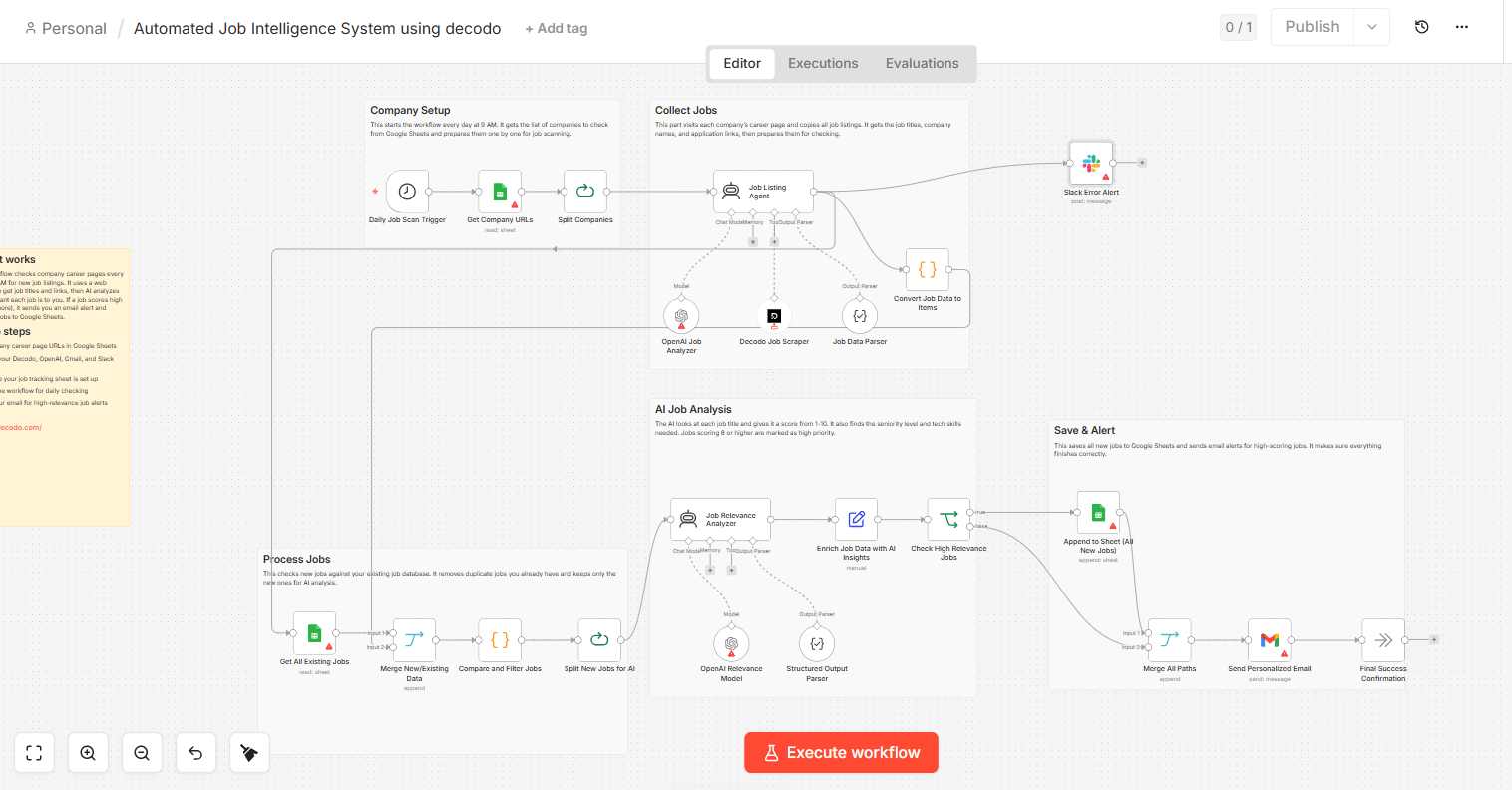
There are 4 phases:
Phase 1 — Company Setup: The system reads your list of target companies from a Google Sheet and prepares to check each one.
Phase 2 — Collect Jobs: Decodo (a web scraper) visits each company’s career page and pulls every job listing — title, link, description.
Phase 3 — Process Jobs: The system checks your existing job database so it only analyzes new listings. No duplicates.
Phase 4 — AI Job Analysis + Save & Alert: OpenAI scores each new listing 1–10 for relevance. High-score jobs get logged to your Google Sheet and sent to your Gmail instantly.
That’s the whole system. Four phases. One clean workflow. Let’s build it.
What you need before you start
☑ n8n account — cloud or self-hosted. Cloud is easier to start. Go to n8n.io and create a free account.
☑ Decodo account — this is the web scraper. Go to decodo.com and get API access. Free tier works for starting out.
☑ OpenAI API key — go to platform.openai.com → API keys → create a new key. Save it somewhere.
☑ Google account — for Google Sheets and Gmail. You likely already have this.
☑ Slack workspace (optional) — only for error alerts. You can skip this at first.
Now that you have your tools ready, it’s time to set up your data source.
Step 1 — Build your Google Sheet (your company database)
Open Google Sheets and create a new spreadsheet called Job Tracker.
You need two tabs:
Tab 1: Companies
Column A Column B Company Name Career Page URLGooglecareers.google.comStripestripe.com/jobsNotionnotion.so/careers
Add every company you want to track. Start with 20–30. You can always add more later.
Tab 2: Jobs
Column A Column B Column C Column D Column E Column F Job Title Company Job URL AI Score Seniority Date Found
This tab starts empty. The system fills it automatically.
Now copy the Google Sheet URL. You’ll need it inside n8n.
Step 2 — Create your n8n workflow
Open n8n and click New Workflow. Name it: Job Intelligence System.
Now you’re going to build it node by node.
Step 3 — Phase 1: Company Setup
Node 1: Schedule Trigger
This starts everything.
Add a Schedule Trigger node.
Set it to run at 9:00 AM every day.
Timezone: your local timezone.
This is the alarm clock for your system. Everything else runs because of this node.
Node 2: Get Company URLs
Add a Google Sheets node.
Connect your Google account when prompted.
Select your spreadsheet → Sheet: Companies
Operation: Get All Rows
This pulls your entire company list every morning.
Node 3: Split Companies
Add a Split In Batches node.
Set batch size to 1.
This makes n8n process one company at a time. Without this, the scraper gets confused when handling multiple companies at once.
Now that your companies are split and ready, the system can go visit each career page.
Step 4 — Phase 2: Collect Jobs
Node 4: Decodo Job Scraper
This is where the real work happens.
Add an HTTP Request node.
Rename it: Decodo Job Scraper
Method: POST
URL:
https://api.decodo.com/v1/scrape(check Decodo’s docs for your exact endpoint)Authentication: Header Auth → Key:
Authorization→ Value:Bearer YOUR_DECODO_API_KEY
In the body, add:
{
  "url": "{{ $json['Career Page URL'] }}",
  "js_render": true,
  "wait_for": ".job-listing"
}
The js_render: true is important. Most career pages load listings using JavaScript. Without this, Decodo scrapes a blank page.
A quick note on Decodo: Some career pages are protected (Workday, Greenhouse, Lever). For those, you’ll need to use Decodo’s structured data endpoints instead of basic scraping. Their docs cover this. Don’t skip it — about 40% of companies use these platforms.
Node 5: Job Listing Agent (AI parsing)
Add an OpenAI node.
Connect your OpenAI API key.
Model: gpt-4o-mini (fast and cheap for this task)
Operation: Message a Model
System prompt:
You are a job listing parser. You receive raw HTML or text scraped from a company career page. Extract all job listings you can find. For each job, return: job_title, job_url, job_description (first 300 characters only). Return as a JSON array. If no jobs found, return an empty array [].User message:
{{ $json['data'] }}This turns raw scraped HTML into clean, structured job data.
Node 6: Job Data Parser
Add a Code node (JavaScript).
Rename it: Job Data Parser
Paste this code:
javascript
const rawOutput = $input.first().json.choices[0].message.content;

let jobs;
try {
  jobs = JSON.parse(rawOutput);
} catch(e) {
  jobs = [];
}

return jobs.map(job => ({
  json: {
    job_title: job.job_title || '',
    job_url: job.job_url || '',
    job_description: job.job_description || '',
    company: $('Get Company URLs').first().json['Company Name']
  }
}));
Node 7: Convert Job Data to Items
Add a Split Out node.
Field to split out: leave default (splits array into individual items)
Now each job is its own item flowing through the workflow. This makes the next phase clean to work with.
Step 5 — Phase 3: Process Jobs (deduplication)
This phase stops you from re-analyzing jobs you’ve already seen.
Node 8: Get All Existing Jobs
Add another Google Sheets node.
Operation: Get All Rows
Sheet: Jobs (your second tab)
This pulls everything you’ve already saved.
Node 9: Merge New/Existing Data
Add a Merge node.
Mode: Combine
Combine By: Position
Connect Node 7 (new jobs) to Input 1. Connect Node 8 (existing jobs) to Input 2.
Node 10: Compare and Filter Jobs
Add a Code node.
Rename it: Compare and Filter Jobs
Paste this:
javascript
const newJobs = $input.all();
const existingUrls = new Set(
  $('Get All Existing Jobs').all().map(item => item.json['Job URL'])
);

return newJobs.filter(job => !existingUrls.has(job.json.job_url));
This removes any job URL that’s already in your sheet. You only process truly new listings.
Node 11: Split New Jobs for AI
Add another Split In Batches node.
Batch size: 5
Processing 5 at a time stops you from hitting OpenAI rate limits. Now you’re ready to score them.
Step 6 — Phase 4: AI Job Analysis
This is where the system gets smart.
Node 12: Job Relevance Analyzer
Add an OpenAI node.
Model: gpt-4o (use the full model here — scoring accuracy matters)
System prompt:
You are a job relevance scorer. You receive a job listing and a candidate profile. Score how well this job matches the candidate on a scale of 1 to 10. Also identify: seniority level (Junior/Mid/Senior/Lead), and the top 3 technical skills required. Return ONLY a JSON object with these fields: relevance_score (integer 1-10), seniority (string), required_skills (array of 3 strings), score_reason (one sentence max).User message:
JOB TITLE: {{ $json.job_title }}
COMPANY: {{ $json.company }}
JOB DESCRIPTION: {{ $json.job_description }}

CANDIDATE PROFILE:
Role target: Product Manager / Operations
Skills: AI tools, automation, n8n, data analysis, project management
Experience: 2 years
Preference: Remote or hybrid, growth-stage companies
Edit the candidate profile section to match your actual skills and target role. This is the most important part of the whole system. Be specific. The more specific you are, the better the scores.
Node 13: Structured Output Parser
Add a Code node.
javascript
const content = $input.first().json.choices[0].message.content;
let parsed;
try {
  parsed = JSON.parse(content);
} catch(e) {
  parsed = { relevance_score: 0, seniority: 'Unknown', required_skills: [], score_reason: 'Parse error' };
}

return [{
  json: {
    ...$('Split New Jobs for AI').first().json,
    relevance_score: parsed.relevance_score,
    seniority: parsed.seniority,
    required_skills: parsed.required_skills.join(', '),
    score_reason: parsed.score_reason
  }
}];
Node 14: Enrich Job Data with AI Insights
Add a Set node.
Rename it: Enrich Job Data with AI Insights
Add these fields:
date_found→ Value:{{ $now.toISO() }}is_high_priority→ Value:{{ $json.relevance_score >= 8 }}
Node 15: Check High Relevance Jobs
Add an If node.
Condition:
{{ $json.relevance_score }}Greater Than or Equal To8
This splits the flow. Score 8 or above goes right (high priority). Everything else goes left (still saved, just no email alert).
Now that jobs are scored and filtered, it’s time to save and alert.
Step 7 — Phase 4 continued: Save & Alert
Node 16: Append to Sheet (All New Jobs)
Add a Google Sheets node.
Operation: Append Row
Sheet: Jobs
Map these columns:
Job Title →
{{ $json.job_title }}Company →
{{ $json.company }}Job URL →
{{ $json.job_url }}AI Score →
{{ $json.relevance_score }}Seniority →
{{ $json.seniority }}Date Found →
{{ $json.date_found }}
Every new job gets logged. Low relevance and high relevance both get saved here.
Node 17: Send Personalized Email (high-relevance only)
This node only triggers for jobs scoring 8+.
Add a Gmail node.
Operation: Send Email
Connect your Gmail account.
To: your email address
Subject:
High Match: {{ $json.job_title }} at {{ $json.company }} (Score: {{ $json.relevance_score }}/10)Body:
New high-relevance job found.

Role: {{ $json.job_title }}
Company: {{ $json.company }}
Score: {{ $json.relevance_score }}/10
Seniority: {{ $json.seniority }}
Skills needed: {{ $json.required_skills }}
Why it matched: {{ $json.score_reason }}

Apply here: {{ $json.job_url }}

---
Found by your Job Intelligence System — {{ $json.date_found }}
Node 18: Merge All Paths
Add a Merge node after both branches (high priority and low priority).
Mode: Append
This brings both paths back together so the workflow finishes cleanly.
Node 19: Final Success Confirmation (optional)
Add a Set node.
Add one field:
status→Workflow completed successfully
You can connect this to a Slack message if you want a daily confirmation that the system ran. Not required. But useful to know it’s working.
The one thing most people get wrong when building this
They add too many companies on day one.
Start with 20 companies. Let it run for a week. Check that the scraper is actually pulling listings (some career pages will block scrapers — you’ll need to handle those manually or find an API alternative for that company).
Once it’s stable at 20, add more. I’m at 200 now. I got there in about a month.
Also: update your candidate profile in Node 12 every few weeks. Your target role changes. Your skills grow. The scoring only works if the profile stays accurate.

What this system actually changes
You stop reacting to job boards.
The job board refreshes for you. The AI filters for you. Your inbox becomes the only interface you need.
I built this in a weekend. No technical background. Just n8n, Decodo, and a Google Sheet.
The system found opportunities I would have missed on day one — because good roles disappear fast, and most people find out too late.
You don’t need to be faster at applying.
You need to find out sooner.
Build this. Run it for a week. Then tell me what it found.
If you found this useful, forward it to one person who’s job hunting right now. That’s the best thing you can do with it.
— Ramesh